Environment Setup For App Service CloudCADI
The CloudCADI application is hosted as an Azure App Service. For up and running the application requires the Client ID, Tenant ID, and Client Secret.
Prerequisites
- Client ID
- Tenant ID
- Client Secret
1.1 Setup for Cloudcadi
-
Step 1. Log in to the Azure Portal.
-
Step 2: Search for App Services, select the app service name Cloudcadi.

Setting Section
-
Click on the "Environment variables" tab which is under the settings section.
-
Under the App settings add the details below.
-
Use the Client ID and Tenant ID which in Overview Page of the created Service Principal Go to Overview Page
-
Use the Client Secret value which is created in the Service Principal Go to Client Secret
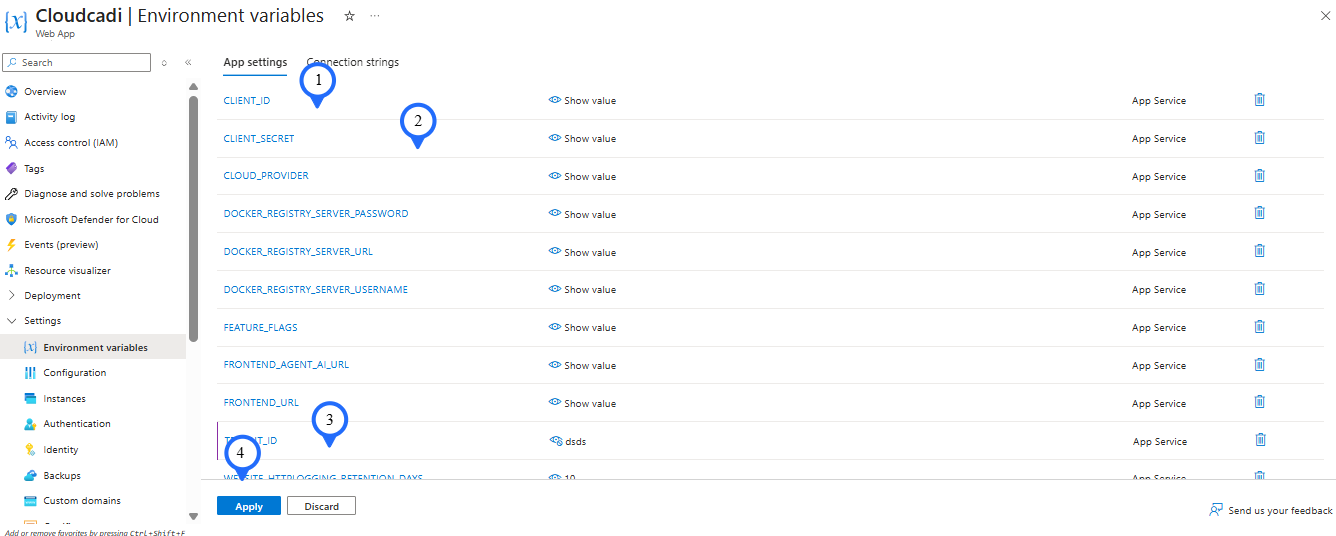
- Click on Apply on the bottom to save the configuration.